



Dispatch technicians with the right job details
Record the location, equipment, reported problem and deadline. Assign a technician and add access instructions, previous findings and the checks required for the visit.
Manage service requests, technician visits and scheduled maintenance in one workflow. Give field teams the job details and checklists they need, then review work notes, parts and photos. Create, edit and sign service reports directly in the ActiveMap mobile app using your company's forms.

Keep the customer's reported fault, assigned technician, work performed and remaining issues connected to the same service job.
Record the location, equipment, reported problem and deadline. Assign a technician and add access instructions, previous findings and the checks required for the visit.
Use mobile maintenance checklists to record observations, work completed, parts used and before-and-after photos. Technicians can note equipment condition and any work still required.
Check the service results before closing the job. Assign a return visit or additional repair when needed and keep it linked to the original request and service report.
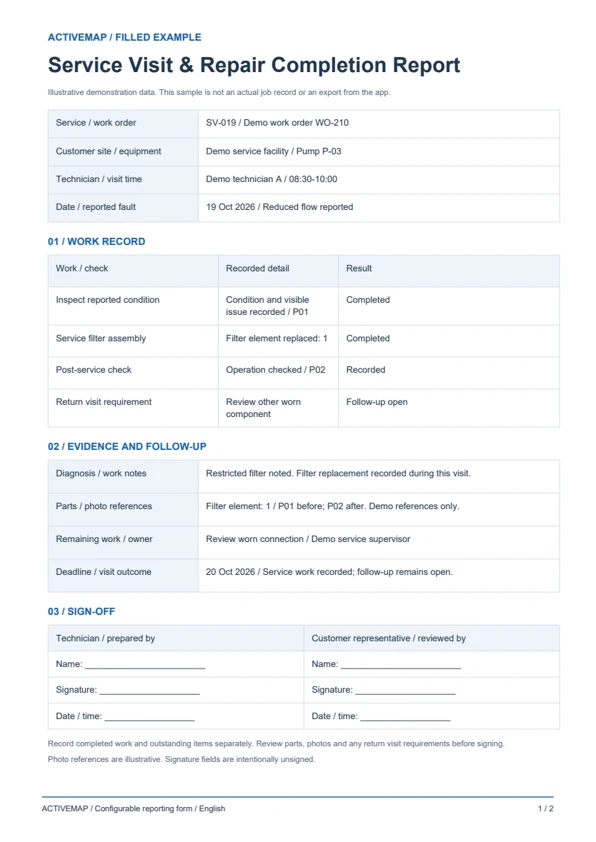
Replace handwritten service sheets with a document completed at the customer site. Record the fault, diagnosis, repairs, parts and remaining work, then review and sign the report in the app. The PDF includes a filled service visit example and a blank service report template.
A service record for repair companies, maintenance contractors and mobile technicians documenting the result of each visit.
Illustrative reports with demonstration data. Your fields and document layout can be configured in ActiveMap.
Upload and configure your existing template yourself, or ask the ActiveMap team to help. Define the fields, photos and signatures your process requires, then reuse the form for future jobs.
Yes. You can configure your template yourself or have the ActiveMap team set it up for your workflow.
Yes. Staff can create, edit and sign reporting documents directly in the mobile app, reviewing the details before final sign-off.
Yes. Record completed work and outstanding items separately. Include the parts or checks still needed and assign a follow-up task with an owner and deadline before final closure.
Bring a report your team uses today. See how to complete, edit and sign it in ActiveMap.