Plan checks against agreed technical requirements
Assign the supervisor, contractor, location and inspection date. Include the work package, relevant specification or drawing reference and checklist for the work to be examined.
Give technical supervisors a clear record of contractor checks, engineering requirements and open remarks. Link findings to the site, asset or work package, with checklist results and photos. Create, edit and sign technical supervision reports directly in the ActiveMap mobile app using your project's inspection forms.

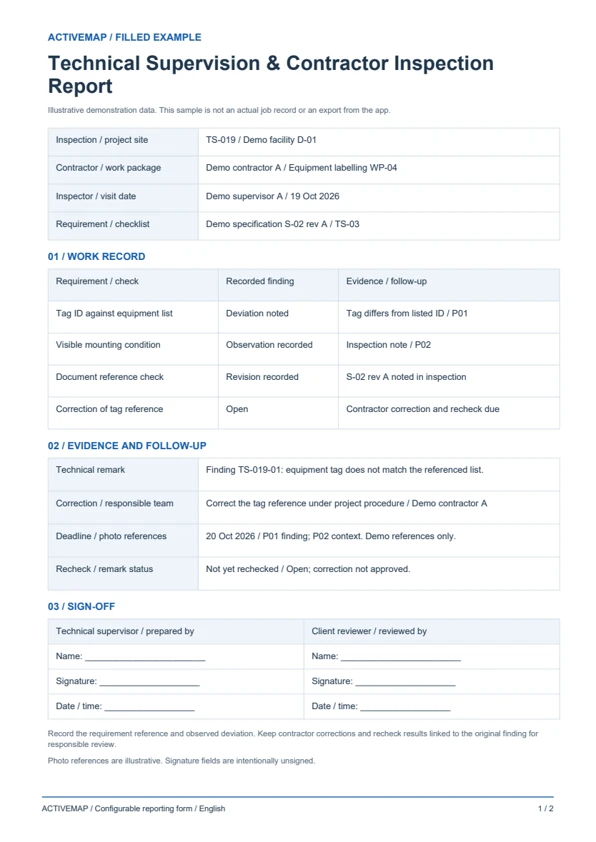
Keep the requirement checked, the inspector's observation and the contractor's correction connected so reviewers can follow each technical remark.
Assign the supervisor, contractor, location and inspection date. Include the work package, relevant specification or drawing reference and checklist for the work to be examined.
Record observations, entered measurements and photos against the agreed criteria. Describe the deviation and assign a correction with an owner and deadline, keeping it linked to the original inspection.
Check the contractor's work notes and evidence, record the reinspection result and identify any remaining issues. The responsible reviewer updates the remark's status after checking the correction.
Replace handwritten inspection notes with a structured technical report. Record the requirements, findings, corrections and recheck results, then edit and sign the document in the app. The PDF includes a filled contractor inspection example and a blank technical supervision report template.
An inspection record for engineering supervisors, client representatives and quality teams checking contractor work against agreed technical requirements.
Illustrative reports with demonstration data. Your fields and document layout can be configured in ActiveMap.
Upload and configure your existing template yourself, or ask the ActiveMap team to help. Define the fields, photos and signatures your process requires, then reuse the form for future jobs.
Yes. You can configure your template yourself or have the ActiveMap team set it up for your workflow.
Yes. Staff can create, edit and sign reporting documents directly in the mobile app, reviewing the details before final sign-off.
Yes. Record the contractor and work package in each inspection and remark. Assign corrective tasks to the responsible team and keep their evidence and recheck results with the original finding.
Bring a report your team uses today. See how to complete, edit and sign it in ActiveMap.