


Proof, not promisesField Service Software
with Same-Day Photo Proof
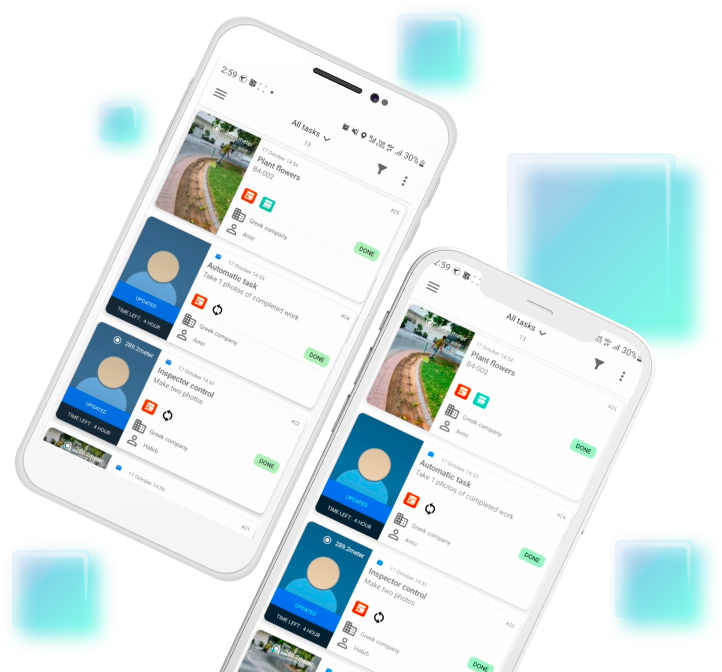
Every job is backed by a photo taken in the app, with the time and the coordinates of the place. The report is ready the same day, so the dispute is closed before it starts.
Free forever — 50 tasks a month
No card and no trial period. Paid plans add your own report template, automatic delivery to your client and your own source of tasks.

Field Service Solutions by Industry
Cleaning Staff Management


Manage commercial cleaning across offices, shops and shared facilities. Assign recurring jobs, guide cleaners with mobile checklists and review before-and-after photos. Create, edit and sign cleaning completion reports directly in the ActiveMap mobile app using your customer's reporting format.
Book a demo with your form See sample reports
Explore solutionRoad Inspection and Maintenance

Assign road inspections and maintenance jobs to field crews. Record completed work, quantities, materials and photos on site, then create, edit and sign reports in the ActiveMap mobile app using your organisation's forms.
Book a demo with your form See sample reports
Explore solutionFleet Maintenance Management

Manage vehicle checks, scheduled servicing and repair tasks for your fleet. Give drivers and mechanics mobile inspection checklists, record vehicle condition and odometer readings, and track defects through repair. Create, edit and sign vehicle inspection and maintenance reports directly in the ActiveMap mobile app.
Book a demo with your form See sample reports
Explore solutionEnergy and Utility Field Operations

Coordinate inspections, planned maintenance and repair visits for energy and utility field crews. Keep work linked to the site and asset being serviced, with checklists, entered readings and photos. Create, edit and sign utility inspection and maintenance reports directly in the ActiveMap mobile app using your organisation's forms.
Book a demo with your form See sample reports
Explore solutionContractor Task Management

Keep site supervisors, crews and subcontractors working from a shared record of daily tasks and progress. Record completed work, quantities, materials, photos and site issues. Create, edit and sign construction daily reports directly in the ActiveMap mobile app using your project's reporting format.
Book a demo with your form See sample reports
Explore solutionMobile Inspections and Audits

Run site inspections and audits with mobile checklists and photo evidence. Record findings, assign corrective work, and create, edit and sign inspection reports directly in the ActiveMap mobile app using your own forms.
Book a demo with your form See sample reports
Explore solutionSafety and Compliance Inspections

Organise industrial site rounds and workplace safety inspections with mobile checklists. Record observed hazards, photos and the priority assigned under your site's procedure, then track corrective work to a documented recheck. Create, edit and sign safety inspection reports directly in the ActiveMap mobile app using your organisation's forms.
Book a demo with your form See sample reports
Explore solutionProperty Maintenance Management

Manage repair requests, routine building checks and contractor visits across residential and commercial properties. Give maintenance teams the location, access details and checklist for each job. Create, edit and sign property maintenance reports directly in the ActiveMap mobile app, with work notes, parts, photos and remaining actions.
Book a demo with your form See sample reports
Explore solutionEffortless Workflow: Activemap's Automatic Task Cycle
Maximize your field staff’s efficiency with ActiveMap's ingenious automatic task feature. Designed for service companies facing unpredictable work volumes, this smart scenario generates new work orders seamlessly after the current one is complete. No need for direct task assignments— your team moves from one job to the next with autonomous precision. Imagine litter-picking or pre-drive vehicle checks transitioning smoothly without managerial cues. Each task is effortlessly logged with location-specific details, propelling your operations into a realm of unparalleled productivity.
Dispatch with a Tap: Streamlining With ActiveMap
With ActiveMap, dispatching is a breeze – select a worker, pick a site, and send a work order, all with just two smartphone taps. There's no need for calls or texts; assign tasks effortlessly, even using voice commands. Field staff are guided to precise locations, ensuring service companies deliver prompt, organized care to every designated spot. ActiveMap isn't just about managing territories; it's about perfecting pinpoint service efficiency.
Inspector's Edge: ActiveMap for Field Excellence
ActiveMap empowers inspectors with an automated solution for uncovering and addressing unexpected issues during routine surveys. This inspector-centric scenario optimizes field staff operations, enabling swift documentation and corrective task assignment to service companies. With ActiveMap, inspectors effortlessly assign emergency work orders to contractors right on site, ensuring seamless maintenance and enhancing organizational efficiency. It's the ultimate mobile ally for ensuring standards are not just met but exceeded, across all service territories.
Scheduled Success with ActiveMap
ActiveMap's Scheduled Scenario is ideal for companies inundated with regular maintenance or cleaning tasks. It effortlessly aligns with technical service regulations, ensuring periodic work orders are never missed. Just upload a task calendar via an Excel template and let ActiveMap do the rest: auto-assigning tasks to field staff and overseeing execution with precision. Streamline your routine service operations, and let ActiveMap's automation keep your workflow on track and efficient.
What Our Customers are Saying About Us


Sofia Gutierrez
Post-Sale Coordinator at CampoEquipar, Argentina

Aarav Patel
Operations Manager at Agritech Solutions, India

Aishah Binti Mahmud
Operations Manager at ServTech Solutions, Malaysia

Harith Bin Said
Operations Director at GreenTech Innovations, Malaysia

Mustafa Kemal
Chief Operations Officer at Anatolian Technical Services, Turkey

Priyanka Deshmukh
Customer Engagement Director at Monsoon Coolers Ltd., India

Siyabonga Nkosi
Office Coordinator at GreenTech Solutions SASimplify your Fieldwork with ActiveMap Today!
Say goodbye to paper trails and complex reporting. Activemap brings field staff and office teams
a mobile app that transforms work orders into effortless, automated successes. Embrace simple, yet powerful field service management. Join the Activemap revolution now!
- Download the app and create your company
- Invite your team
- Create and assign some work orders
- Receive performance reports
Discover ActiveMap Advantages
Smart Finance Decisions with Activemap Insights
- Boost accountability with performance tracking.
- Expose underperformers with clear oversight.
- Link marketing spend to sales for better ROI.
- Get instant financial insights for revenue tracking.
- Cut costs with automated work order dispatch.
- Increase task completions with efficient allocation.
- Access instant reports proving tasks are done correctly and on time.

Efficiency in Scheduling & Field Sync
- Streamline scheduling and dispatching on one platform.
- Communicate with field staff via chat and voice.
- Assign tasks based on technician proximity.
- Reduce downtime, enhance job quality and response times.
- Optimize field staff work hours for maximum efficiency.
- Promptly address incomplete or incorrectly executed tasks.
- Ensure continuous operation offline with auto-sync when online.
- Encourage your workforce by paying more to your best performers.
- Automatically document work results and maintain client history.

The Ultimate Field Partner for Easy operations
- View all daily tasks in order with detailed information for each.
- In-app guidance for correct task execution.
- Quick access to necessary information for task completion.
- Real-time online interaction with dispatch and customers.
- Access to service object information and maintenance schedules.

ActiveMap Blog
All articles The Hidden Reality of Shopping Mall Cleaning
How ActiveMap replaces scattered spreadsheets, chats, and manual reports with one task management workflow.
The Hidden Reality of Shopping Mall Cleaning
How ActiveMap replaces scattered spreadsheets, chats, and manual reports with one task management workflow.
 Photo reports as proof of completed work
Why before-and-after photos help confirm service quality and reduce disputes with contractors and clients.
Photo reports as proof of completed work
Why before-and-after photos help confirm service quality and reduce disputes with contractors and clients.
 Case study: how a cleaning team speeds up site control
A short case on how mobile tasks, checklists, and photo reports improve control for distributed cleaning sites.
Case study: how a cleaning team speeds up site control
A short case on how mobile tasks, checklists, and photo reports improve control for distributed cleaning sites.
 What to consider when updating a mobile app for field teams
A quick look at what matters when improving the mobile workflow for employees who work on site every day.
What to consider when updating a mobile app for field teams
A quick look at what matters when improving the mobile workflow for employees who work on site every day.
 Routes and tasks: how to reduce manual dispatcher workload
Why route-aware task assignment helps teams respond faster and coordinate daily field work with less effort.
Routes and tasks: how to reduce manual dispatcher workload
Why route-aware task assignment helps teams respond faster and coordinate daily field work with less effort.