Assign courier jobs with delivery instructions
Send the delivery address, contact details, time window and goods information to the driver's phone. Dispatchers can review job status and update priorities when plans change.
Give courier and delivery teams a clear record of every handoff. Assign delivery jobs, record quantities and exceptions, and capture photos and recipient signatures. Create, edit and sign proof of delivery documents directly in the ActiveMap mobile app using your delivery form.

Keep the delivery address, instructions, task status and handoff evidence connected to the same job.
Send the delivery address, contact details, time window and goods information to the driver's phone. Dispatchers can review job status and update priorities when plans change.
Record the delivered items and quantities, add photos and collect the recipient's signature. Keep the delivery time and location information with the completed task.
Record missing or damaged items and the reason for an unsuccessful delivery. Add supporting photos and assign a follow-up task instead of marking incomplete work as delivered.
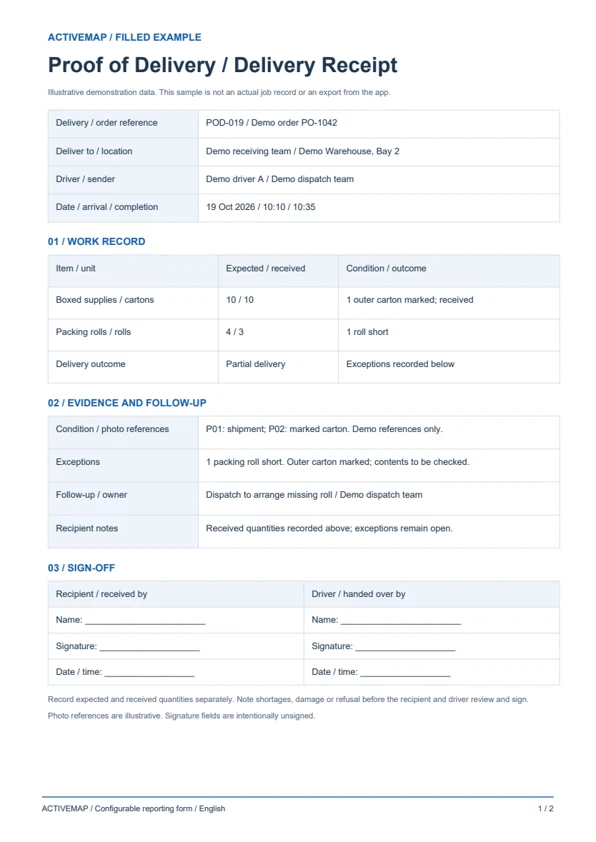
Replace the paper delivery receipt with an electronic proof of delivery record. Review the shipment details and any exceptions, edit the document and sign it in the app. The sample includes a filled delivery record and a blank proof of delivery template.
A handoff record for couriers and delivery teams documenting what was received and any differences from the order.
Illustrative reports with demonstration data. Your fields and document layout can be configured in ActiveMap.
Upload and configure your existing template yourself, or ask the ActiveMap team to help. Define the fields, photos and signatures your process requires, then reuse the form for future jobs.
Yes. You can configure your template yourself or have the ActiveMap team set it up for your workflow.
Yes. Staff can create, edit and sign reporting documents directly in the mobile app, reviewing the details before final sign-off.
Yes. Configure fields for expected and received quantities, condition and delivery exceptions. Record the details and photos before the recipient and driver review and sign the document.
Bring a report your team uses today. See how to complete, edit and sign it in ActiveMap.