Set up the equipment round and checklist
Specify the generating unit, plant room, equipment references and shift. Assign the responsible specialist and the checks defined by your plant's inspection procedure.
Organise equipment rounds and maintenance assignments at power generation facilities. Link each check to the generating unit, plant area and equipment ID. Record observations, entered readings and photographs, then create, edit and sign an equipment inspection log in the ActiveMap mobile app using your plant's forms.

Support operating and maintenance teams inspecting generating units and auxiliary plant equipment. Keep the round results, reported defects and assigned maintenance work together by equipment reference.
Specify the generating unit, plant room, equipment references and shift. Assign the responsible specialist and the checks defined by your plant's inspection procedure.
Record readings with units and their measurement point, describe visible conditions and add photographs. The responsible specialist enters the result and assessment for each check.
Record each defect and the next action, responsible team and due date. Review the round log, sign it in the app and keep follow-up work linked to the equipment.
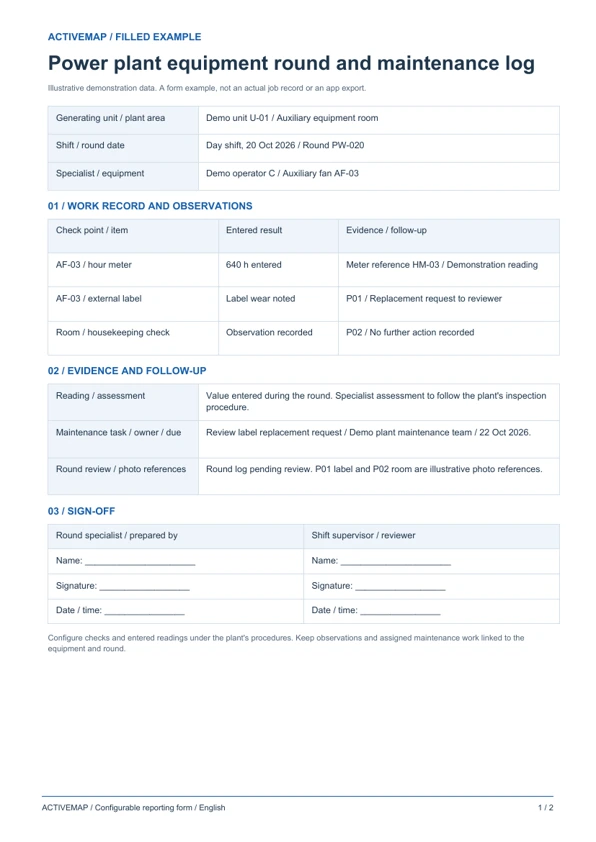
Keep shift inspection results and follow-up work in one document. The PDF includes a filled example and a blank log for equipment rounds at a power generation facility.
A reporting form for plant teams documenting checks on generating unit auxiliaries and plant room equipment, with entered readings, observations and review.
Illustrative reports with demonstration data. Your fields and document layout can be configured in ActiveMap.
Upload and configure your existing template yourself, or ask the ActiveMap team to help. Define the fields, photos and signatures your process requires, then reuse the form for future jobs.
Yes. You can configure your template yourself or have the ActiveMap team set it up for your workflow.
Yes. Staff can create, edit and sign reporting documents directly in the mobile app, reviewing the details before final sign-off.
Configure fields for each check point, reading, unit and specialist's assessment. The team enters the data during the round and records any required maintenance action under the plant's procedures.
Bring a report your team uses today. See how to complete, edit and sign it in ActiveMap.