Agree project references and data exchange
Identify the project, stage and external task reference. Agree the fields, exchange direction and supported integration or export format with your team.
Connect project planning with the work performed on site. Keep project references, field tasks, statuses and photographic evidence together. Crews create, edit and sign completion reports in the ActiveMap mobile app; agree how these records are exchanged with your project management system.

Define the information the project manager needs from a completed site task, then configure the agreed exchange workflow.
Identify the project, stage and external task reference. Agree the fields, exchange direction and supported integration or export format with your team.
Assign the field task and collect checklist results, photographs, actual dates and remaining issues. Keep the project and task references in the completion report.
Check the reported result and outstanding work, then sign the document. Use the agreed integration or export process to transfer the required statuses and reporting data.
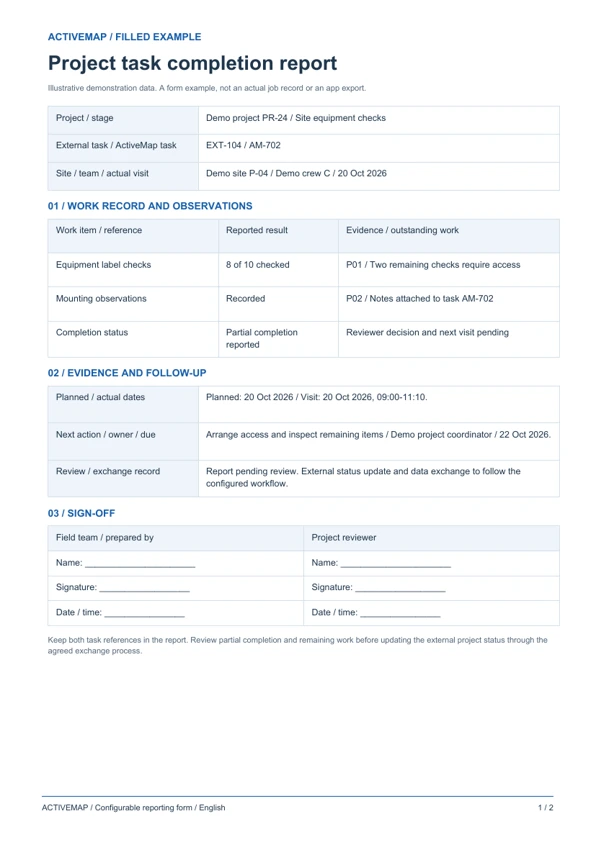
Give project managers a structured field work report linked to the original task. The PDF includes a filled example and a blank form for completed work, evidence, remaining actions and review.
A site reporting form for project managers, contractors and field teams connecting a completed job to a project stage and external task reference.
Illustrative reports with demonstration data. Your fields and document layout can be configured in ActiveMap.
Upload and configure your existing template yourself, or ask the ActiveMap team to help. Define the fields, photos and signatures your process requires, then reuse the form for future jobs.
Yes. You can configure your template yourself or have the ActiveMap team set it up for your workflow.
Yes. Staff can create, edit and sign reporting documents directly in the mobile app, reviewing the details before final sign-off.
Connection options depend on your system's API and supported data formats. Share your current workflow so the teams can agree the fields, exchange direction, update frequency and setup requirements before implementation.
Bring a report your team uses today. See how to complete, edit and sign it in ActiveMap.