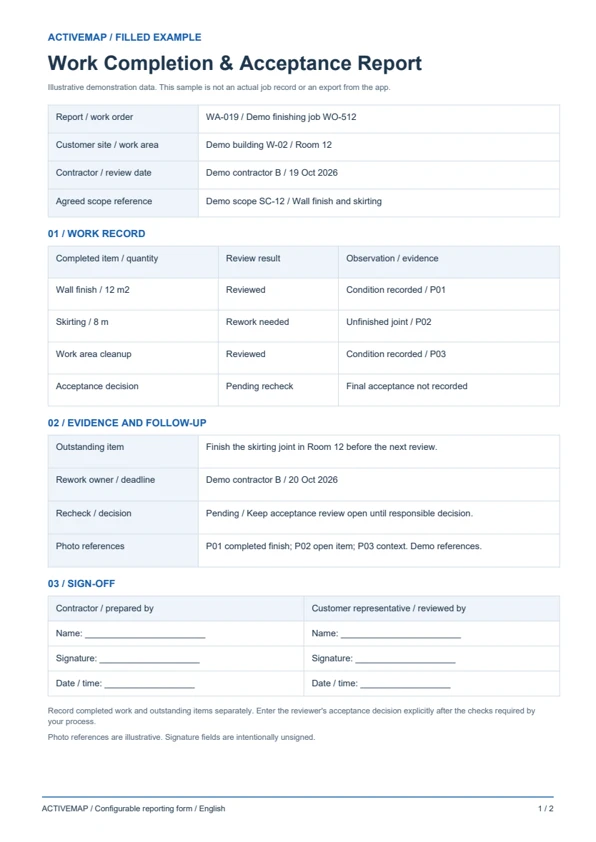
Prepare the completed work for review
Record the site, work order, contractor and agreed scope. Include completed items, quantities where relevant, checklist results and before-and-after photos for the reviewer.
Review completed work against the agreed scope, checklist and supporting photos. Record the reviewer's decision, outstanding items and any required rework before final closure. Create, edit and sign work completion and acceptance reports directly in the ActiveMap mobile app using your customer's reporting format.

Keep the contractor's completion record, the customer's review and any open punch list items connected to the same job.
Record the site, work order, contractor and agreed scope. Include completed items, quantities where relevant, checklist results and before-and-after photos for the reviewer.
Check the results against the agreed requirements. Record the review outcome and describe any incomplete or unsatisfactory item with a location, photo and required correction.
Assign remaining work with an owner and deadline. Add correction evidence and the recheck result, then update the acceptance decision and sign the report according to your review process.
Replace paper completion sheets with a report reviewed at the site. Record completed work, acceptance checks and unresolved items, then edit and sign the document in the app. The PDF includes a filled review example and a blank work completion and acceptance report template.
A completion and review record for service contractors, site managers and customer representatives checking a finished job or work package.
Illustrative reports with demonstration data. Your fields and document layout can be configured in ActiveMap.
Upload and configure your existing template yourself, or ask the ActiveMap team to help. Define the fields, photos and signatures your process requires, then reuse the form for future jobs.
Yes. You can configure your template yourself or have the ActiveMap team set it up for your workflow.
Yes. Staff can create, edit and sign reporting documents directly in the mobile app, reviewing the details before final sign-off.
Yes. Record the review outcome and outstanding items explicitly. Assign the remaining work and retain the report for a later recheck before the responsible reviewer records the final acceptance decision.
Bring a report your team uses today. See how to complete, edit and sign it in ActiveMap.