Telecom Field Service Management Software

Coordinate installation, repair and maintenance visits for telecom field teams. Give technicians the site, equipment and service instructions for each job, then review work notes, readings and photos. Create, edit and sign telecom service reports directly in the ActiveMap mobile app using your organisation's forms.

Book a demo with your formSee sample reports

Telecom technician recording field service work with a mobile device

Telecom maintenance and installation work across your sites

Keep the service request, site access details, equipment references and visit results connected so the next technician can see what was checked and what remains open.

Assign installation, repair and maintenance visits

Schedule work by site, technician and deadline. Add access instructions, equipment or circuit references and the checklist for the job, from a customer connection to a network cabinet or base station visit.

Record checks, readings and installation photos

Follow the mobile checklist and enter the measurements and units required by your procedure. Document connections, component replacements and installation condition with work notes and photos.

Review service results and follow-up work

Check completed work and unresolved issues before closing the visit. Assign corrective work or a return visit, keeping the original findings and service report available for the next check.

Explore planned maintenance tasks and technician checklists

Telecom installation and maintenance report template

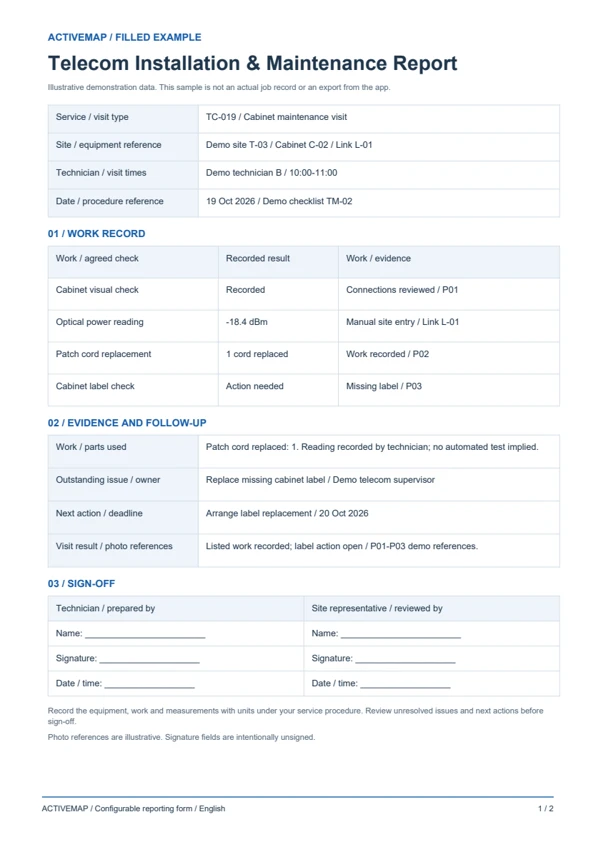
Replace handwritten service sheets with a report completed at the customer site or network asset. Record the work, readings, parts and remaining issues, then edit and sign the document in the app. The PDF includes a filled telecom service example and a blank maintenance report template.

Telecom Installation & Maintenance Report

A visit record for telecom technicians and installation contractors documenting work on connections, cabinets, base stations and other network equipment.

  • Site, service request, technician, visit times and equipment / circuit references
  • Installation or maintenance work, entered readings with units, parts and photos
  • Unresolved issues, follow-up owner, next action and technician / customer signatures
Show document previewTelecom Installation & Maintenance ReportView sample (PDF, English)

Illustrative reports with demonstration data. Your fields and document layout can be configured in ActiveMap.

Use your own reporting templates

Upload and configure your existing template yourself, or ask the ActiveMap team to help. Define the fields, photos and signatures your process requires, then reuse the form for future jobs.

Questions about mobile reports

Can we use our customer's document format?

Yes. You can configure your template yourself or have the ActiveMap team set it up for your workflow.

Can staff edit and sign documents on their phones?

Yes. Staff can create, edit and sign reporting documents directly in the mobile app, reviewing the details before final sign-off.

Can installation and maintenance visits use different forms?

Yes. Configure the fields and checklist for each visit type. A connection form can record equipment and installation checks, while a maintenance form can include readings, repairs and remaining defects. Technicians enter results according to your service procedure.

See your telecom service report in ActiveMap

Bring a report your team uses today. See how to complete, edit and sign it in ActiveMap.

Take your field service to the next level - try ActiveMap!

Take your field service to the next level - try ActiveMap!