Assign patrol routes and checkpoint checks
Give guards the site instructions, checkpoints, checklists and planned visit times. Specify what to inspect at each point, such as doors, gates, lighting or perimeter condition.
Coordinate guard patrols and site checks with clear instructions for each post and checkpoint. Record visit times, observations, incidents and photos so supervisors can review the shift. Create, edit and sign security patrol reports directly in the ActiveMap mobile app using your company's reporting forms.

Keep patrol assignments, checkpoint findings and handover notes connected to the right customer site and shift.
Give guards the site instructions, checkpoints, checklists and planned visit times. Specify what to inspect at each point, such as doors, gates, lighting or perimeter condition.
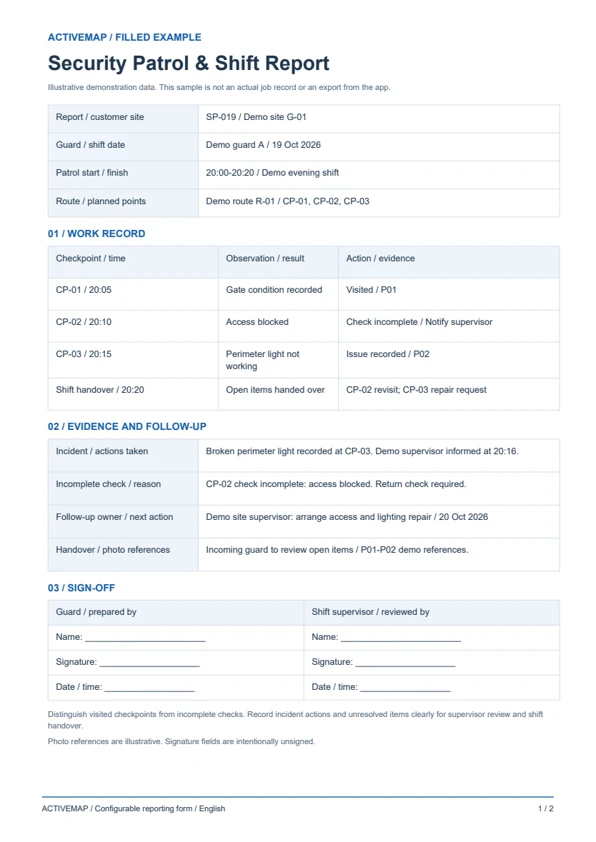
Record each visited checkpoint, observed condition and photos. Describe incidents or incomplete checks with the location, time and actions taken so the supervisor can review what happened.
Check patrol results, open incidents and handover notes. Assign an owner and deadline for unresolved issues and record the next action for the incoming guard or site team.
Replace handwritten patrol logs with a shift report completed on site. Record checkpoint results, incidents and outstanding actions, then edit and sign the document in the app. The PDF includes a filled patrol example and a blank security patrol report template.
A patrol and handover record for security companies, site guards and supervisors documenting the checks performed during a shift.
Illustrative reports with demonstration data. Your fields and document layout can be configured in ActiveMap.
Upload and configure your existing template yourself, or ask the ActiveMap team to help. Define the fields, photos and signatures your process requires, then reuse the form for future jobs.
Yes. You can configure your template yourself or have the ActiveMap team set it up for your workflow.
Yes. Staff can create, edit and sign reporting documents directly in the mobile app, reviewing the details before final sign-off.
Yes. Record completed checks and missed or incomplete checkpoints separately. Add the reason, open issue and next action so the supervisor and incoming guard can review what still needs attention.
Bring a report your team uses today. See how to complete, edit and sign it in ActiveMap.