Assign site tasks to crews and subcontractors
Specify the work location, instructions, responsible team and deadline. Include the checks and photos required for the task so crews know what to record before it is reviewed.
Keep site supervisors, crews and subcontractors working from a shared record of daily tasks and progress. Record completed work, quantities, materials, photos and site issues. Create, edit and sign construction daily reports directly in the ActiveMap mobile app using your project's reporting format.

Connect assigned work, site observations and completion evidence to the project, floor or work area where the activity takes place.
Specify the work location, instructions, responsible team and deadline. Include the checks and photos required for the task so crews know what to record before it is reviewed.
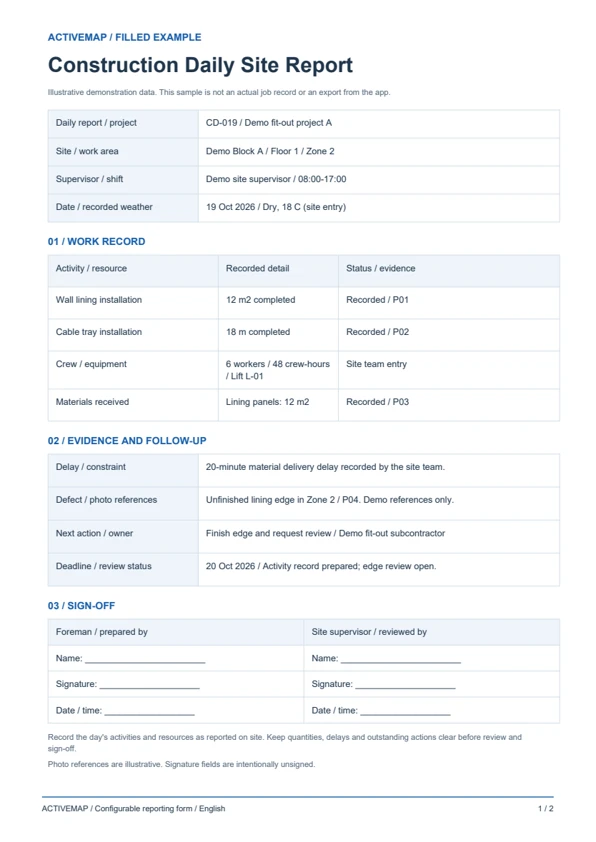
Document work completed, quantities, crew hours, materials and equipment used. Add progress photos and note weather, delivery constraints or other delays as reported by the site team.
Record a defect or an incomplete activity, assign corrective work and set a review date. Keep follow-up notes and photos connected to the original site task.
Replace handwritten site diaries with a structured daily report. Record the day's activities, resources, delays, photos and outstanding actions, then review and sign the document in the app. The PDF includes a filled daily site report and a blank construction daily report template.
A daily record for construction contractors, foremen and site supervisors documenting progress and work still requiring attention.
Illustrative reports with demonstration data. Your fields and document layout can be configured in ActiveMap.
Upload and configure your existing template yourself, or ask the ActiveMap team to help. Define the fields, photos and signatures your process requires, then reuse the form for future jobs.
Yes. You can configure your template yourself or have the ActiveMap team set it up for your workflow.
Yes. Staff can create, edit and sign reporting documents directly in the mobile app, reviewing the details before final sign-off.
Yes. Separate completed activities from open items. Record the responsible team, required next action and deadline, then link a follow-up task so the issue can be checked on a later visit.
Bring a report your team uses today. See how to complete, edit and sign it in ActiveMap.